


• • 9/16/26 11:52 am • 19 logs
- 122k views • 25 today
- save_alt 34.7k downloads • 10 today
- Compatibility
- Minecraft 1.19
- to version
- Minecraft 26.3 snapshot
- Changes include
- Functions
- Recipes

814
Racks V.3
Expose your tools and weapons!
From Minecraft 1.20.5 to 26.3
Expose your tools and weapons!
From Minecraft 1.20.5 to 26.3
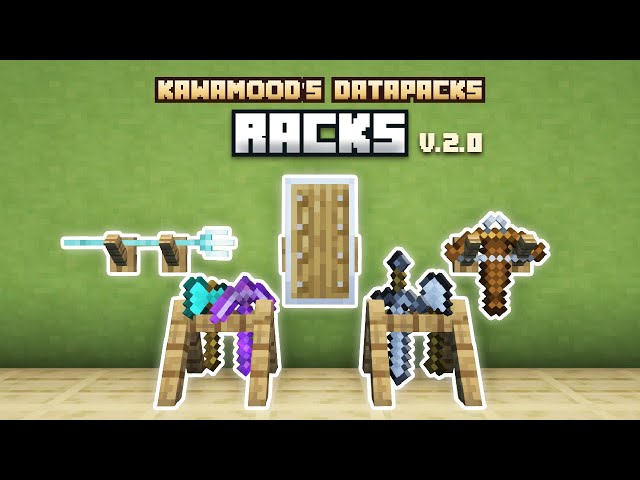
What is Racks?
Racks allow you to showcase your tool and weapons, so you don't need to hide them in your chests anymore.
This data pack brings a complementary support to armor stands that only support armors (without using commands) on the Java Edition.
Racks placed on the ground can handle: axes, hoes, pickaxes, shovels, swords, fishing rod, carrot on a stick and warped fungus on a stick.
Racks placed on a wall can handle: axes, hoes, pickaxes, shovels, swords, bow, crossbow, trident, fishing rod, shield, shears, brush, spyglass, carrot on a stick and warped fungus on a stick.
Right clicking racks while sneaking will change their pose (their items rotation and position).
Ground racks have 6 different poses, and wall racks have 4 different poses.
Discover the whole presentation & documentation on the Modrinth page !




19 Update Logs
V.3.3.0 : by KawaMood 09/16/2026 11:52:11 amSeptember 16 @ 3:52 pm UTC
- Updated for 26.3.
LOAD MORE LOGS
More like this

 Copper ToolsMinecraft 1.17 - 1.18 Quality of Life Data Pack
 TecKillA
4/27/22 9:50
• posted 11/26/21 8:46
9k 1.6kx 61311
TecKillA
4/27/22 9:50
• posted 11/26/21 8:46
9k 1.6kx 61311 Eliminate click collision in item frames attached to chestsMinecraft 1.20 Quality of Life Data Pack
 Keeema
•8/25/23 5:49
3.8k 7x 11312
Keeema
•8/25/23 5:49
3.8k 7x 11312 Better Iten DisplayingMinecraft 1.13 - 1.20 Quality of Life Data Pack
 Sturmbueffel100
12/27/23 8:09
• posted 10/13/23 11:05
2.8k 204 4x 51112
Sturmbueffel100
12/27/23 8:09
• posted 10/13/23 11:05
2.8k 204 4x 51112 Fancy Combat - Tool Weapons, Shields, Camouflage, and WandsMinecraft 1.21 - 26.2 Other Data Pack
 FancyPotatOS
7/23/26 7:08
• posted 2/9/26 7:14
1.2k 143 6x 6149
FancyPotatOS
7/23/26 7:08
• posted 2/9/26 7:14
1.2k 143 6x 6149
 BluJayy_
5519490
119






 exceptionallyquiet

 Adamic39



 MintRefresh
Have something to say?
any help i can get on how to fix it?
Check your latest.log file to see what error it sends.
Error: Player not found.
https://github.com/KawaMood/racks/tree/for_1.20_to_1.20.4
Also, I have tried multiple times to retry by starting over from scratch on a backup with v2, but the same tool racks fail and when I manually remove the v2 tool racks in question before doing the update, it does not solve the problem and it makes others fail instead or makes the ones I normally removed in v2 fail again when updating to v3.
Otherwise, is there a way to individually update a tool rack or delete its texture when the entity is no longer there please?
Thank you for reading.
Alternatively if they don't have important items, you can kill the entities using the following command while being near them:
/kill @e[type=#pk_racks:custom_block_components,tag=pk.racks,distance=..5]